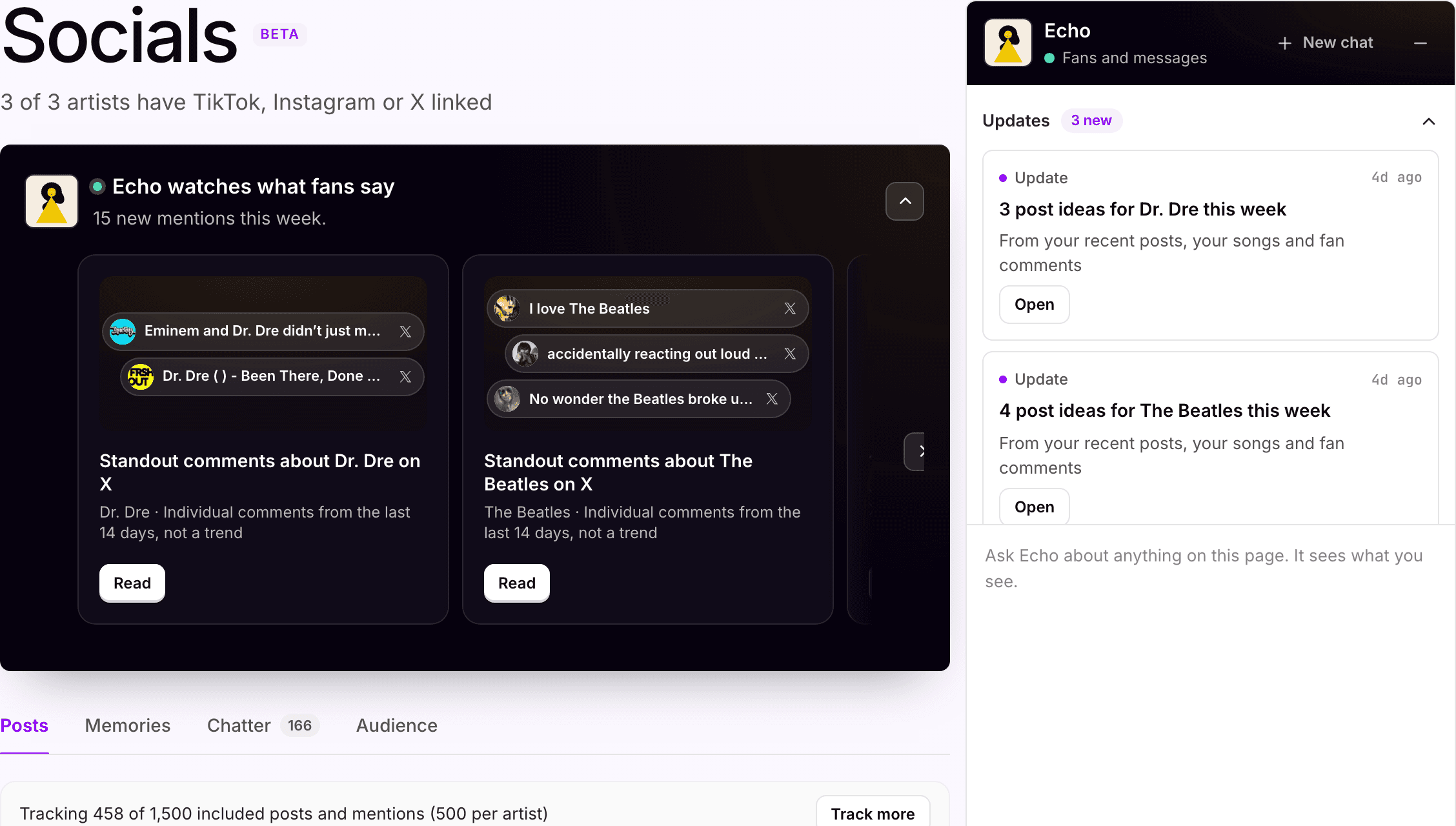
Hear what fans are saying
before it turns into a trend.
Comments and mentions from every linked account, read across the roster. Echo surfaces what stands out per artist and drafts post ideas; your team decides what to make.
For Digital managers · Label marketing teams · Management companies
Where it starts
Six accounts, one read. Your team decides what to make of it.
Where your team starts
Comments spread across every account your artists run.
TikTok, Instagram and X for each artist on the roster. The line everyone is quoting sits in one thread, the complaint in another, and nobody has time to scroll all of them.
What Symphony does
One Socials screen for the roster.
Link the accounts once. Posts, comments and mentions come in per artist. Echo reads the sentiment, flags the standout comments and turns the week's reactions into post ideas.
What your team reviews
What counts as a signal, and what gets made.
Echo reports individual comments from the last 14 days and says when it is one comment, not a trend. Your team decides which ones matter and which post ideas go into production.
How your team starts it
Open Socials, or ask Echo.
Scroll the comments by artist in Socials, or ask Echo how a song or a clip is landing. She reads the comments, saves, shares and sentiment on the platforms you connect and answers in plain language.
Hands-on, in the workspace
- 01Link each artist's TikTok, Instagram and X accounts.
- 02Read posts, comments and mentions per artist, newest first.
- 03Open a standout comment to see the post and thread behind it.
- 04Take a post idea from the side panel into the content calendar.
Next time
Next week's standout comments and post ideas are waiting on Home, with the ones your team already used marked off.Or brief Echo

Echo
Fan messaging
What Symphony does
Reads the comments. Hands back the ideas.
01
Pulls in every linked account
Posts, comments and mentions from TikTok, Instagram and X, per artist, across the roster.
02
Surfaces what stands out
Echo reads the sentiment and flags the individual comments worth a look from the last 14 days, and says plainly when it is one comment and not a trend.
03
Turns reactions into post ideas
The week's posts, songs and fan reactions become post ideas per artist in the side panel. Your team decides what gets made.
In the workspace
The screen.
Socials · Advanced plan
What fans are saying, across every linked account
Standout comments about each artist, the posts behind them, and post ideas for the week in the side panel. Echo reads; your team decides what to make.
What your team gets back
The roster's comments, in one place.
A Socials screen per workspace, filtered by artist, with the standout comments and post ideas in the panel. The week's read lands on Home.
AI support
Echo, fan messaging.
Echo reads the comments and drafts the ideas. She does not post, reply or publish anything; your team decides what gets made.
How Echo works →Plan, and what is separate
Advanced
Socials is on the Advanced plan, $250 per artist per month. It tracks 500 posts per artist a month; each extra block of 500 is $50.
Linked
The accounts your team connects stay yours. Disconnect any time.
Credits
Echo's reads run on the credits included with your plan. Top up any time.
Your subscription covers the software. Media spend, creator payments, extra credits and managed services are separate where they apply. Compare plans.
Next step
See it with your artists.
Tell us which artists and workflows you want to start with. We’ll shape the walkthrough around them, then talk through the setup and what it would cost.