The marketing workspace for the teams behind artists

The busywork, off your desk.The strategy, back on it.

Symphony sets up campaigns, watches the catalog, drafts the fan sends and writes the update. Your team approves and decides.

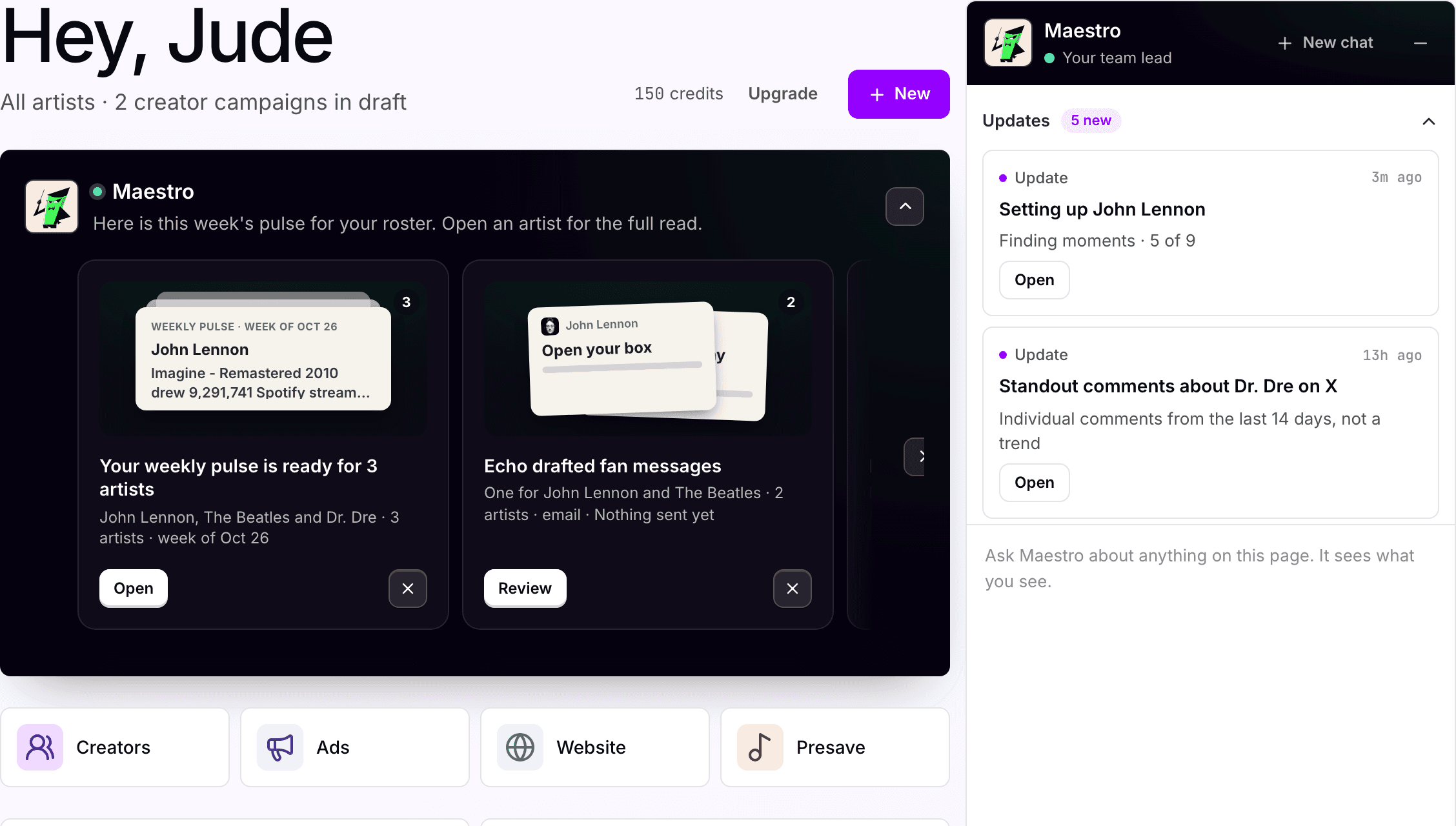
The Symphony home screen for the Apple Corps workspace: the week's pulse from Maestro, quick actions, and the Maestro panel.

Used by real humans at these companies

  • Gamma
  • UnitedMasters
  • Giant Music
  • Symphonic
  • LVRN
  • SoundCloud
  • SinceThe80s
  • Downtown
  • Nice Life Recording Company
  • CD Baby
  • Audiomack
  • Bandsintown
  • Groover
  • EngineEars
  • Daily Playlists

The workspace

See what is moving.
Decide what to do next.

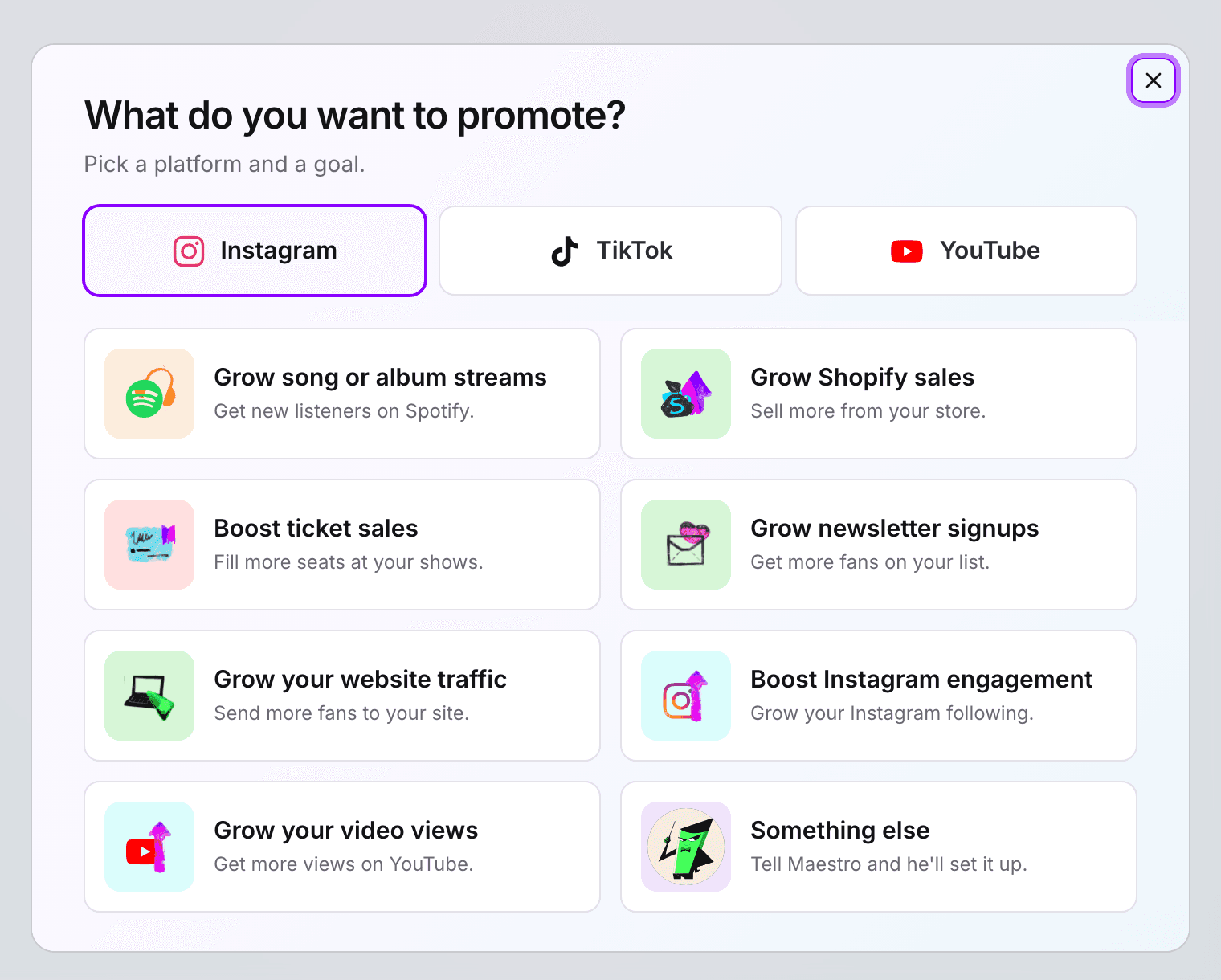
The campaign builder's first step: pick a platform (Instagram, TikTok, YouTube) and a goal such as growing streams, ticket sales or newsletter signups.

Advertising campaigns

Flight a campaign in minutes, not an afternoon

Give Simmy the artist, the goal and the budget. She builds the whole thing, audience, creative, budget and schedule, on the ad accounts your team owns, and leaves it paused for sign-off. One approval and it runs inside the budget you set.

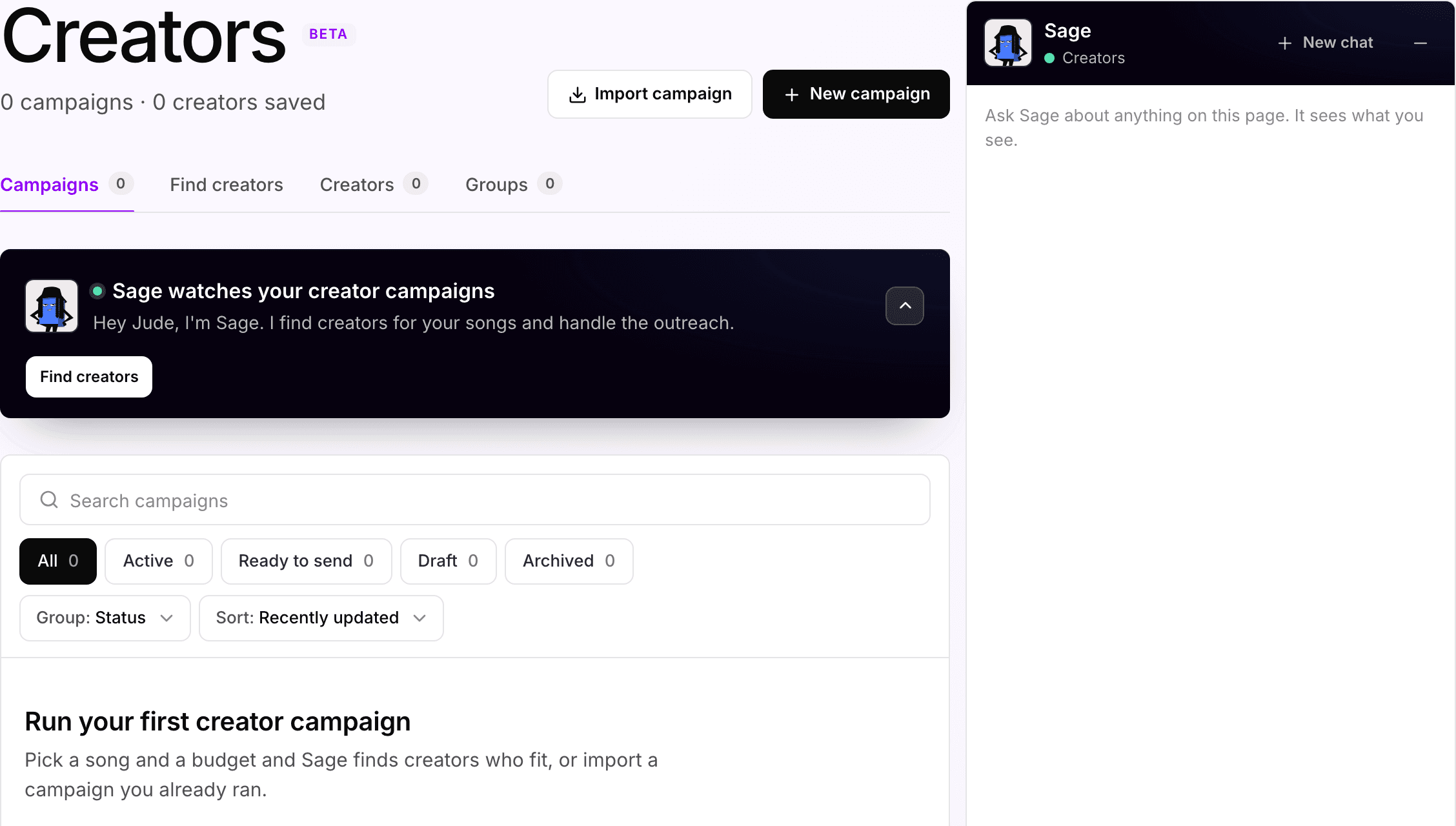
The Creators screen: campaigns by status, a creator search, saved creators and groups, and Sage's note that she finds creators for the songs and handles the outreach.

Creator campaigns · Advanced plan

350M+ creator pages, narrowed to the ones moving your song

Sage starts with who is already posting to the record, scores every account on what its posts actually reached rather than follower count, and drafts the outreach. Your team approves the shortlist, sets the rate band and releases each batch. Creator payments stay yours to set, outside the plan.

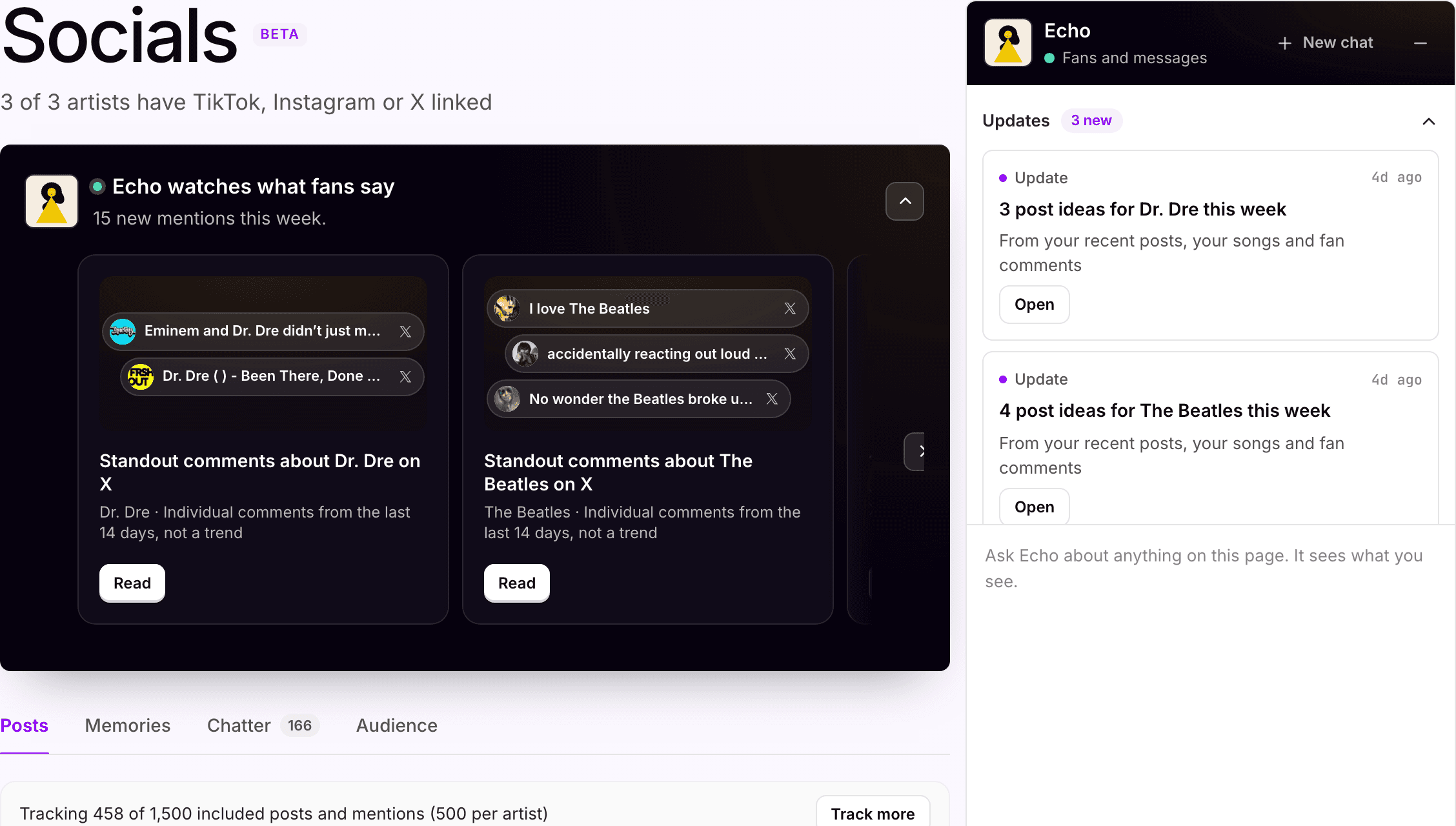
The Socials screen: Echo watches what fans say, with standout comments about Dr. Dre and The Beatles on X, and post ideas for each artist in the side panel.

Social listening · Advanced plan

Hear what fans are saying before it turns into a trend

Every linked TikTok, Instagram and X account, with the comments and mentions pulled in across the roster. Echo surfaces the standout comments on each artist and turns the week's posts, songs and fan reactions into post ideas your team can run with. No scrolling six accounts to find the line everyone is quoting.

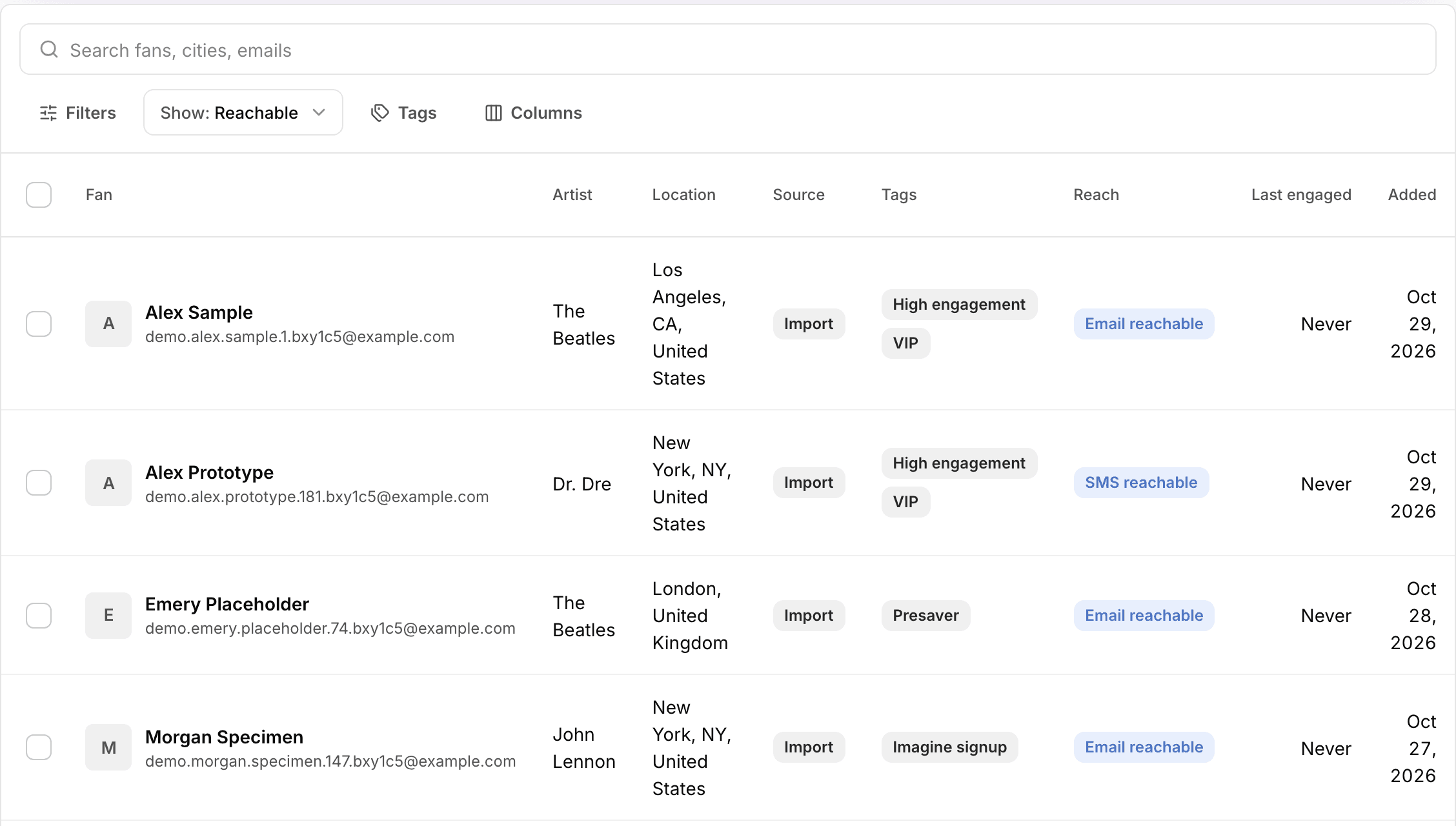
The CRM fan list for the Apple Corps workspace: search, filters and tags, with each fan's artist, location and source in a row.

CRM

A fan list you own, with the next message already drafted

Fans, saved audiences and messages in one place, imported from wherever they live today or captured by a pre-save. Echo drafts the email or text and holds it until someone on your team signs off.

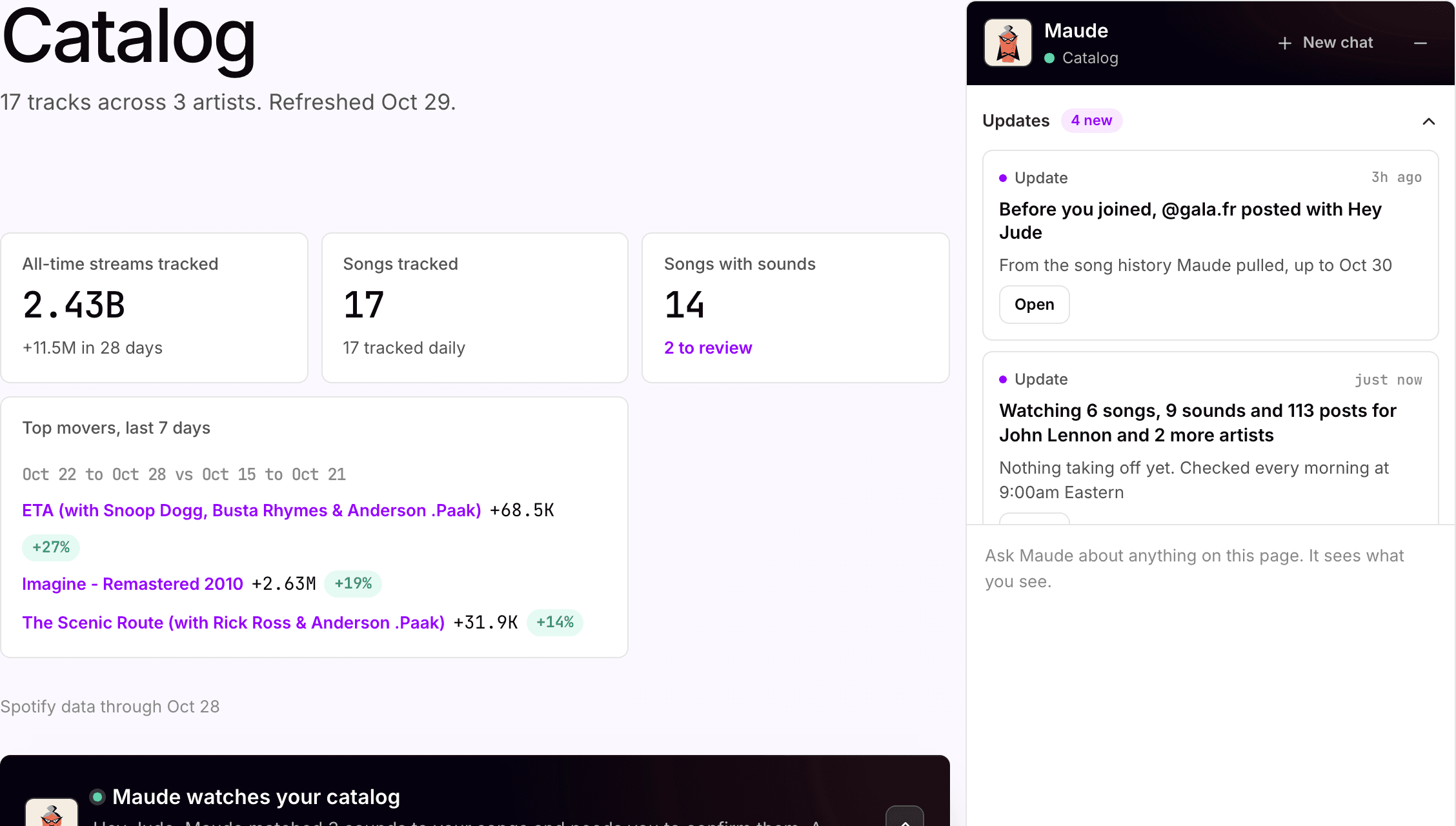
The top of the Catalog screen: 12 tracks across two artists, all-time streams, songs with sounds, and the top movers of the last seven days with Imagine first.

Catalog · Advanced plan

Know why a song moved before anyone asks

Every tracked song on the roster, watched daily, with the likely cause next to the number. Maude matches TikTok sounds to the songs they carry, flags the movers and marks the newest day unconfirmed until the streaming services finish reporting. The artist's manager hears it from you, not from a screenshot.

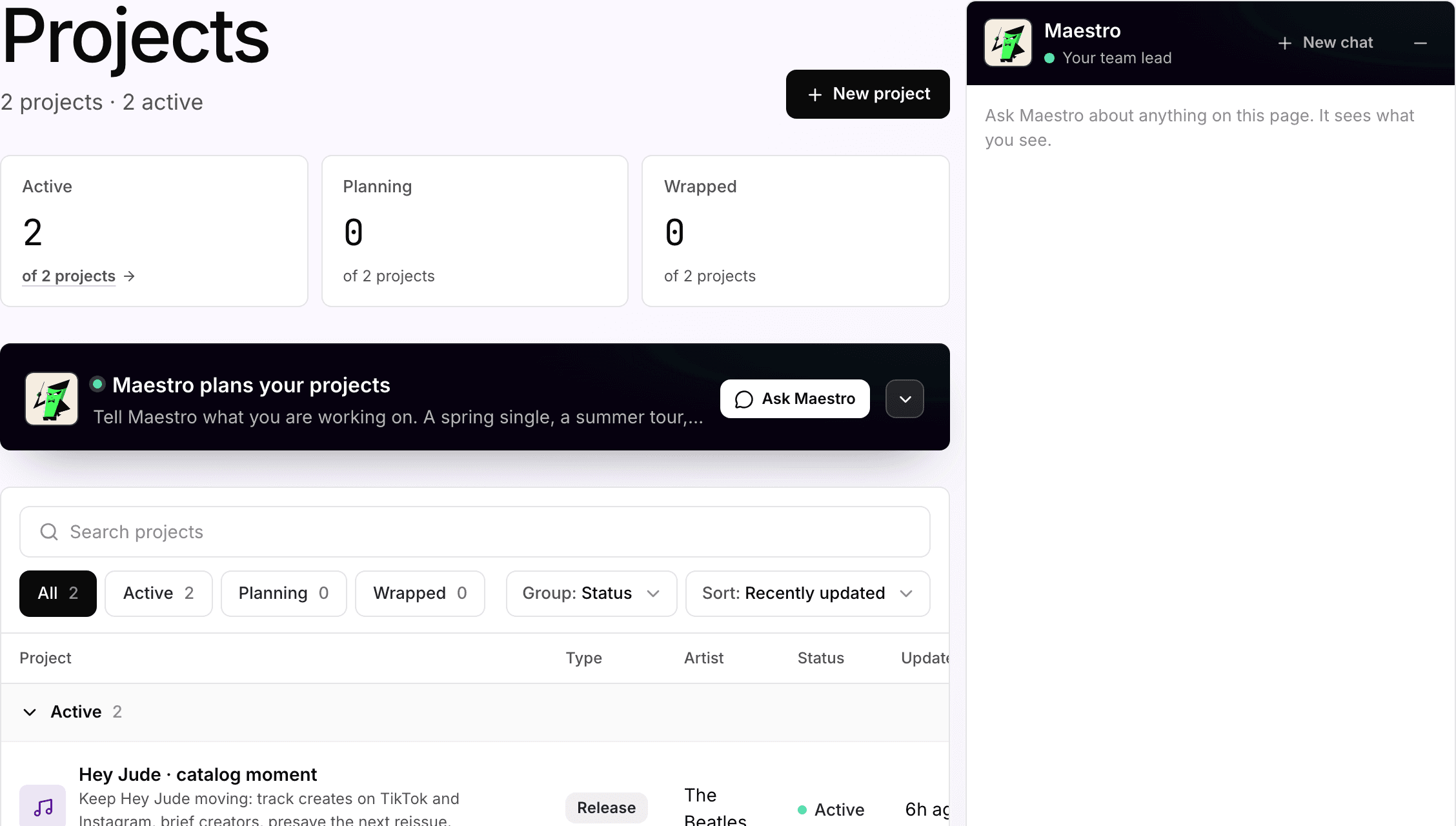
The Projects screen for the Apple Corps workspace: two active release projects, each with its artist, type and status, and Maestro on hand to plan the next one.

Projects and memory

A workspace that remembers every artist, so nobody starts from zero

Each project keeps a release's campaigns, pages, posts and plan together, and Symphony keeps the context around it: the last campaign, what worked, what the artist will and will not do, how your team likes to work. Tell Maestro the spring single and the summer tour and he drafts the plan from that memory. Whoever picks it up next starts already briefed.

Team workflows

More support across your artists.
More focus for your team.

01

Cover every artist on the artist roster

Every artist needs someone keeping track, whether or not they have a dedicated marketer. Symphony keeps each artist's songs, posts, and campaigns in one shared workspace, so your team sees what moved without checking every dashboard by hand.

See the workflows →

02

Go from a moving song to a live campaign

When a song or post starts moving, your team sees the likely cause and the options together: share it, boost the post, brief creators, or email fans. Someone on the team picks the next step and approves the spend before anything runs.

See the Catalog workflow →

03

Keep the context when work changes hands

Release plans, campaign history, and the way your team likes to work stay with each artist. The next campaign starts already briefed, whoever picks it up.

Read how Gamma ran JayDon, Loe Shimmy and Hurricane Wisdom →

The work ends with real fans, in real places.

Built with the teams behind artists.

Loe Shimmy at the Gamma pop-up

Customer story

Three artists. One thread.

Gamma runs campaigns for JayDon, Loe Shimmy, and Hurricane Wisdom from one Maestro thread: TikTok ads driving vinyl and CD sales, a matcha pop-up in New York, and a fan website with pre-save and RSVP links. Maestro keeps each artist’s release strategy and the way Gamma likes to work, so every job starts already briefed. Gamma’s team approves what goes out.

“Instead of me having to explain everything from scratch each time, it already has context. That means I spend less time managing the process and more time thinking about the actual marketing and creative direction.”
Steven Dolsky, GammaRead the Gamma story →

Control

Your team stays at the center of the decisions.

Symphony handles the setup, the tracking, and the follow-up. Your team decides what launches, what it costs, and who it reaches. Run it hands-on, let the AI tools carry the routine work, or mix the two artist by artist.

Approvals

Nothing new goes out without your team. New campaigns wait for approval. Every creator outreach batch waits for a person to release it. Every fan email and text waits for sign-off in the CRM, the part of Symphony your team uses to message fans.

Budgets

Your team sets the budget and the spend limits. Media spend runs through your own ad accounts and is billed by the platforms directly, separate from your Symphony plan.

Ad-account ownership

Your ad accounts stay yours. Symphony connects through the official Meta and TikTok APIs: you authorize once, can revoke any time, and no passwords change hands. Audiences, pixels, and fan lists live in accounts you own.

Activity log

Every action is logged: audiences built, spend paced, messages sent, issues flagged. If a number changes, your team can see what was done around it.

AI agents

AI support inside the work, with your team reviewing it.

Each part of the workflow has an AI assistant with one job. It does the setup and the follow-up, shows its work, and hands the decision back to your team.

  1. 01Planning and coordinationMaestroKeeps each artist's plan and context together, and coordinates the work across the other assistants.
  2. 02Paid campaignsSimmyBuilds, paces, and adjusts ads across Meta, TikTok, and YouTube inside the budget your team approves.
  3. 03Release operationsCueTracks the release checklist, schedule, and budget, and sets up link-in-bio pages, pre-saves, and forever-saves.
  4. 04Fan messagingEchoMaps the fans who have shared their details with your artists and drafts the emails and texts that reach them. Every send waits for your team's approval.
  5. 05Business affairs and catalog analysisMaudeReads royalty statements and catalog data, links her sources, and says when she cannot tell what caused a change.
  6. 06Creator campaignsSageSearches 350M+ creator pages for the ones who fit a song, drafts the outreach, and agrees prices inside the range your team sets. Creator payments are separate from your plan.

Plans

A setup that matches your team.

Advanced is the plan for labels, managers and marketing teams: $250 per artist per month, with Catalog, Socials and Creators, and 500 credits per artist. Four artists on Advanced is $1,000 a month with 2,000 credits shared across the workspace and 10 seats. Pro is $49 per artist per month with 2 seats, and $20 for each extra seat. Every artist in a workspace is on the same plan.

Pay quarterly for 5% off, or annually for 10% off the per-artist price. Media spend, creator payments, and extra credits are separate.

Want to try the workspace on your own first? Every new account starts with 150 free credits.

Pro

$49 / month per artist

Quarterly $46.55 (5% off) · Annual $44.10 (10% off)

For a team running ads, pages and fan messaging.

  • Ads, websites and presaves
  • Fans and messaging
  • AI assistants, 250 credits per artist
  • 2 seats, $20 per extra seat
  • No cap on artists
Get Started for Free

Start with 150 free credits.

Advanced

$250 / month per artist

Quarterly $237.50 (5% off) · Annual $225 (10% off)

For labels, managers and marketing teams.

  • Everything in Pro
  • Catalog: 5 songs per artist, $5 per extra song
  • Socials: 500 posts per artist, $50 per extra 500
  • Creators
  • 500 credits per artist
  • 10 seats
  • No cap on artists. More than 10? Ask for a volume quote.
Request a demo

Shaped around your artists.

Enterprise

Custom

For a larger roster that should arrive ready to work.

  • White glove data imports, setup and configuration
  • Custom agents and integrations
  • Dedicated account manager
  • More than 10 seats
Talk to sales

We reply within one business day.

Questions

What teams ask before they start.

What is SymphonyOS?

SymphonyOS is the marketing workspace for the teams behind artists. It runs the setup, the sends and the reporting for every artist on the roster: ads, release pages and pre-saves, fan email and text, catalog and social tracking, creator campaigns and projects. Named AI assistants do the operational work. Your team approves and decides.

Who is Symphony built for?

Labels, management companies, music marketing teams and the artist-services side of distributors. Digital managers use it to run several artists from one screen. Label admins use it to see every report. Independent artists can use the same workspace self-serve, starting free.

Who owns the ad accounts and the spend?

You do. Campaigns run on ad accounts your team connects through the official Meta and TikTok APIs, and you can revoke access any time. Media spend is billed by the platforms directly, so every audience and every dollar is visible in your own Ads Manager.

What goes out without our approval?

Nothing new. New campaigns wait for approval, creator outreach waits for a person to release each batch, and every fan email and text waits for sign-off. Once a campaign is approved, Symphony paces and adjusts it inside the budget your team set.

How do team seats and roles work?

Pro includes 2 seats, then $20 per extra seat per month. Advanced includes 10 seats. Admins see every artist, the team and billing. Members see only the artists you give them, as viewers or editors, so a coordinator can work on one artist while the label admin reads every report.

How many artists can one workspace hold?

There is no cap on artists on either plan. Every artist in a workspace is on the same plan, and credits are shared across all of them. More than 10 artists qualifies for volume pricing on a quote.

How do we bring in the roster we already run?

Import fans from a CSV or your current CRM, import the Meta and TikTok campaigns already running, and add every song you want Catalog to watch. Enterprise adds white glove data imports, setup and configuration, so a larger roster arrives ready to work instead of as a blank workspace.

How does the creator network work?

Sage searches 350M+ creator pages across TikTok and Instagram, starting with who is already posting to the song. She scores each account on what its recent posts actually reached, drafts the outreach and negotiates inside the rate band your team sets. Your team approves the shortlist and releases every batch. Creator payments are separate from the plan.

How do we know the analysis is right?

Every number in Catalog shows where it came from and when. Days a streaming service has not finished reporting are marked unconfirmed, and when the evidence is thin, Maude says she cannot tell what caused a change instead of guessing. Your team reviews the read before anything runs.

Does it work with the tools we already use?

Yes. Symphony works alongside your artist and distributor dashboards and does not need your Spotify for Artists login. Keep the tools that already work for your team, and start with the workflows that fit your setup.

How is pricing counted?

Per artist, per month. Pro is $49 per artist and Advanced is $250 per artist, and every artist in a workspace is on the same plan. Included credits are shared across the workspace, and you can buy more any time. Credits pay for work done in Symphony; they are not ad spend. Media, creator payments, and managed services are separate.

Do we need Advanced to work as a team?

No. Pro includes 2 seats and covers ads, pages, pre-saves, fans and messaging. Advanced is the plan built for teams: 10 seats plus Catalog, Socials and Creators, which is where roster-wide tracking and creator campaigns live.

How does a team demo work?

Request one with your work email and the artists and workflows you want to start with. We shape the walkthrough around them, and if you send a Spotify link we bring that artist's songs and posts into it. Teams that want to try it first can start free the same day.

What happens to our data if we leave?

It stays yours. Fan lists, pixels, and ad audiences live in accounts you own, and artist context exports any time. Monthly plans have no contract.

See Symphony with the artists you work with.

Tell us which artists and workflows you want to start with. We’ll shape the walkthrough around them, then talk through the setup and what it would cost.

No logins or account access needed.