Review the artist roster
every Monday, in one table.
Every tracked song across the artist roster, watched daily and flagged with the cause. Your team scans, sorts and assigns.
For Digital managers · Label marketing teams · Management companies · Distributors
Where it starts
Every artist gets the same Monday read. What moved, why, and what to do.
Where your team starts
A roster of artists and a Monday meeting.
Some artists have a marketer and some do not. Everyone needs the same read: what moved, why, and whether it matters this week.
What Symphony does
Catalog tracks the songs and names the cause.
Streams, creates and link status per track, refreshed daily. Every movement comes with the number, the day and the likely cause.
What your team reviews
Confirmed or not, and who owns it.
Unconfirmed days stay marked, and matched sounds count only once your team confirms them. Your team sorts each moment and assigns an owner.
How your team starts it
Open Catalog, or ask Maude.
Filter Catalog by artist, platform or window, with the top movers at the top. Or ask Maude in the side panel for the roster read.
Hands-on, in the workspace
- 01Scan the top movers for the last 7 days in Catalog.
- 02Open a moment: the chart, the post behind it, the four moves.
- 03Confirm the sounds Maude matched so they count.
- 04Assign an owner and a next move in the artist's project.
Next time
Next Monday, the same ask returns only the new moments, with last week's owners still attached.Or brief Maude

Maude
Business affairs and catalog analysis
Next Monday
What Symphony does
Scan, sort, assign.
01
Scan
Ask Maude for the roster's confirmed moments from the last 14 days, each with its cause.
02
Sort
Three buckets: Protect for confirmed surges, Opportunity for early signs, Note for small or unconfirmed bumps.
03
Assign
One line per mover with an owner and a next move by Wednesday. Ad spend starts only after someone on the team approves it.
In the workspace
The screen.
Catalog · Advanced plan
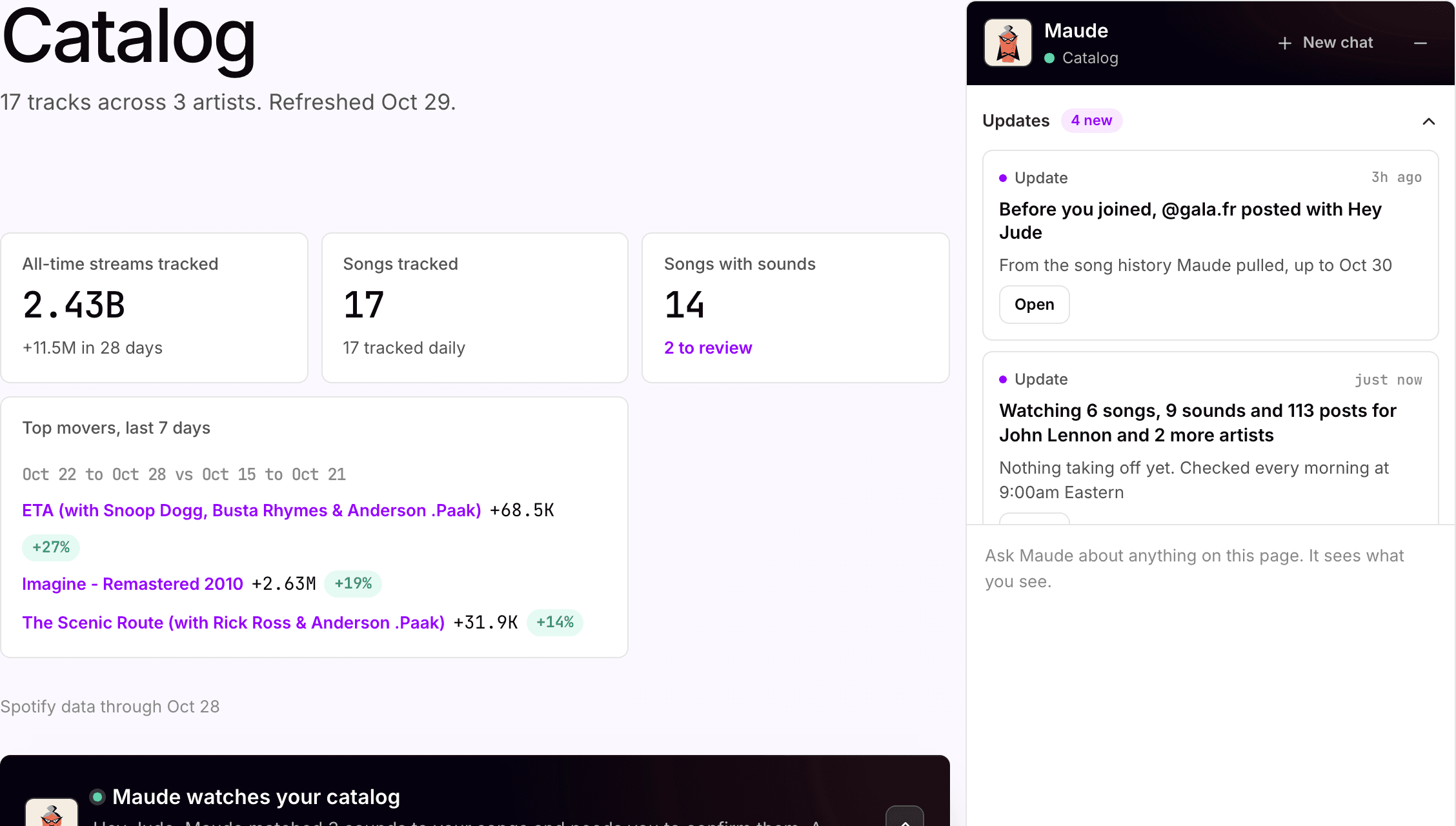
A song starts moving. Catalog says why
Twelve songs across both artists, watched daily, with Imagine as this week's top mover. Maude asks the team to confirm two matched sounds before they count.
What your team gets back
One table, the whole artist roster.
Top growers, songs tracked and sounds linked at the top of the page. Each song page has the 30-day chart, top markets and every moment the song has had.
AI support
Maude, business affairs and catalog analysis.
Maude names the cause with the date and says so when she cannot tell. She never invents a playlist, a creator or a release; your team decides the move.
How Maude works →Plan, and what is separate
Advanced
Catalog is on the Advanced plan, $250 per artist per month. Every artist in the workspace is on the same plan.
5
songs per artist included, then $5 per song per month.
Nothing
spends, posts or sends from a moment until someone on your team says so.
Your subscription covers the software. Media spend, creator payments, extra credits and managed services are separate where they apply. Compare plans.
Next step
See it with your artists.
Tell us which artists and workflows you want to start with. We’ll shape the walkthrough around them, then talk through the setup and what it would cost.